微前端架构实践:基于Wujie的模块化设计
概述
微前端架构允许将前端应用拆分为多个独立部署的子应用,每个子应用可由不同团队使用不同技术栈开发。本文将介绍如何基于腾讯无界(Wujie)框架实现微前端架构,实现控制台级别的模块化和独立部署。
为什么选择微前端
传统单体前端的痛点
- 代码库庞大:随着功能增加,代码量指数增长
- 构建时间长:修改一个小功能需要重新构建整个应用
- 团队协作冲突:多团队在同一代码库中开发容易产生冲突
- 技术栈锁定:难以逐步引入新技术
- 部署风险高:任何小错误都可能影响整个平台
微前端的优势
架构设计
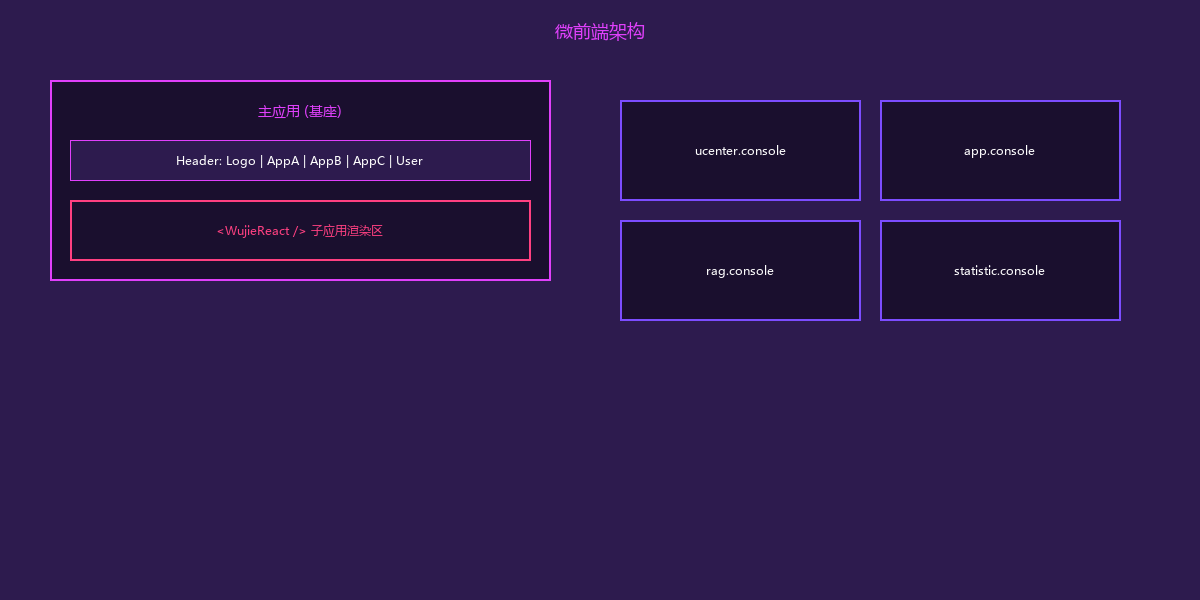
整体架构
┌─────────────────────────────────────────────────────────────────────────────┐
│                        微前端架构设计                                        │
├─────────────────────────────────────────────────────────────────────────────┤
│                                                                             │
│  ┌─────────────────────────────────────────────────────────────────────┐   │
│  │                         主应用 (console)                             │   │
│  │  ┌──────────────────────────────────────────────────────────────┐  │   │
│  │  │                      Header (通用导航)                          │  │   │
│  │  │  Logo    [App A] [App B] [App C] [App D]        User Menu    │  │   │
│  │  └──────────────────────────────────────────────────────────────┘  │   │
│  │  ┌──────────────────────────────────────────────────────────────┐  │   │
│  │  │                                                              │  │   │
│  │  │              子应用渲染区域 (<WujieReact/>)                   │  │   │
│  │  │                                                              │  │   │
│  │  │   ┌─────────────────────────────────────────────────────┐   │  │   │
│  │  │   │                                                     │   │  │   │
│  │  │   │              ucenter.console                        │   │  │   │
│  │  │   │           (用户与权限管理控制台)                      │   │  │   │
│  │  │   │                                                     │   │  │   │
│  │  │   └─────────────────────────────────────────────────────┘   │  │   │
│  │  │                                                              │  │   │
│  │  └──────────────────────────────────────────────────────────────┘  │   │
│  │                                                                     │   │
│  │  职责:                                                              │   │
│  │  - 统一导航和布局                                                    │   │
│  │  - 子应用生命周期管理                                                 │   │
│  │  - 全局状态共享(用户、权限)                                          │   │
│  │  - 公共组件和样式                                                     │   │
│  └─────────────────────────────────────────────────────────────────────┘   │
│                                                                             │
│  ┌─────────────────────────────────────────────────────────────────────┐   │
│  │                         子应用 (独立仓库/独立部署)                    │   │
│  │                                                                     │   │
│  │  ┌──────────────┐  ┌──────────────┐  ┌──────────────┐               │   │
│  │  │ ucenter.     │  │   app.       │  │   rag.       │               │   │
│  │  │  console     │  │  console     │  │  console     │               │   │
│  │  │ (用户中心)    │  │ (应用管理)   │  │ (知识库)     │               │   │
│  │  │ Umi Max      │  │ Umi Max      │  │ Umi Max      │               │   │
│  │  └──────────────┘  └──────────────┘  └──────────────┘               │   │
│  │  ┌──────────────┐  ┌──────────────┐  ┌──────────────┐               │   │
│  │  │statistic.    │  │pdfviewer.    │  │pptonline.    │               │   │
│  │  │  console     │  │  console     │  │  console     │               │   │
│  │  │ (统计分析)   │  │ (PDF控制台)  │  │ (在线PPT)    │               │   │
│  │  │ Umi Max      │  │ Umi Max      │  │ Umi Max      │               │   │
│  │  └──────────────┘  └──────────────┘  └──────────────┘               │   │
│  │                                                                     │   │
│  └─────────────────────────────────────────────────────────────────────┘   │
│                                                                             │
└─────────────────────────────────────────────────────────────────────────────┘
为什么选择Wujie
| 框架 | 隔离方式 | 技术栈兼容 | 性能 | 使用复杂度 |
|---|---|---|---|---|
| qiankun | JS Sandbox + Proxy | 良好 | 中等 | 中等 |
| micro-app | WebComponent | 良好 | 好 | 低 |
| Wujie | iframe + WebComponent | 优秀 | 优秀 | 低 |
| Module Federation | 模块联邦 | 需同源 | 好 | 高 |
Wujie的优势:
- 真正的JS/CSS隔离(iframe天然隔离)
- 无需修改子应用代码(无侵入性)
- 支持vite等现代构建工具
- 子应用保活(切换不重新加载)
- 原生兼容(iframe内完全独立)
主应用实现
1. 项目结构
console/                         # 主控制台
├── src/
│   ├── app.tsx                 # Umi应用配置
│   ├── layouts/
│   │   └── index.tsx           # 主布局(包含导航)
│   ├── pages/
│   │   ├── index.tsx           # 首页
│   │   └── Apps/               # 子应用容器
│   │       └── Jump.tsx        # 子应用跳转页
│   ├── components/
│   │   ├── AppIcon/            # 应用图标组件
│   │   ├── GlobalHeader/       # 全局头部
│   │   └── SubAppContainer/    # 子应用容器包装
│   └── services/
│       └── app.ts              # 应用信息服务
├── config/
│   └── config.ts               # Umi配置
└── package.json
2. 主应用配置
// src/app.tsx
import { RuntimeConfig } from '@umijs/max'

export const layout: RuntimeConfig['layout'] = () => {
  return {
    title: '微服务平台',
    logo: '/logo.png',
    menu: {
      locale: false,
    },
    layout: 'mix',  // 混合布局
    splitMenus: true,
    contentWidth: 'Fluid',
    navTheme: 'light',
    primaryColor: '#1890ff',
  }
}

// 初始化应用列表
export async function getInitialState(): Promise<{
  currentUser?: API.CurrentUser
  apps?: API.AppInfo[]
}> {
  const apps = await fetchAppList()
  const currentUser = await fetchCurrentUser()

  return {
    currentUser,
    apps
  }
}
3. 子应用路由配置
// config/routes.ts
export default [
  {
    path: '/',
    redirect: '/home',
  },
  {
    path: '/home',
    name: '首页',
    component: './Home',
  },
  // 子应用路由 - 动态生成
  {
    path: '/app/:clientCode/*',
    component: './Apps/Jump',
    hideInMenu: true,
  },
]
4. 子应用容器组件
// src/pages/Apps/Jump.tsx
import React, { useEffect, useState } from 'react'
import { useParams, history } from '@umijs/max'
import WujieReact from 'wujie-react'
import { Spin, Result } from 'antd'
import { useModel } from '@umijs/max'

const { bus, preloadApp, destroyApp } = WujieReact

const SubAppContainer: React.FC = () => {
  const { clientCode } = useParams<{ clientCode: string }>()
  const { initialState } = useModel('@@initialState')
  const [appInfo, setAppInfo] = useState<API.AppInfo | null>(null)
  const [loading, setLoading] = useState(true)

  // 获取子应用信息
  useEffect(() => {
    const app = initialState?.apps?.find(a => a.clientCode === clientCode)
    if (app) {
      setAppInfo(app)
    } else {
      history.push('/404')
    }
    setLoading(false)
  }, [clientCode])

  if (loading) {
    return <Spin size="large" style={{ marginTop: 100 }} />
  }

  if (!appInfo) {
    return (
      <Result
        status="404"
        title="应用不存在"
        subTitle={`未找到客户端代码为 "${clientCode}" 的应用`}
      />
    )
  }

  return (
    <WujieReact
      width="100%"
      height="100%"
      name={clientCode}                    // 应用唯一标识
      url={appInfo.url}                   // 子应用URL
      sync={true}                         // 同步路由
      fetch={fetch}                       // 自定义fetch(用于鉴权)
      props={{
        // 传递给子应用的属性
        token: localStorage.getItem('token'),
        userInfo: initialState?.currentUser,
        clientCode: appInfo.clientCode,
      }}
      // 生命周期钩子
      beforeLoad={() => {
        console.log(`[Wujie] ${clientCode} 开始加载`)
      }}
      beforeMount={() => {
        console.log(`[Wujie] ${clientCode} 挂载前`)
      }}
      afterMount={() => {
        console.log(`[Wujie] ${clientCode} 挂载完成`)
      }}
      beforeUnmount={() => {
        console.log(`[Wujie] ${clientCode} 卸载前`)
      }}
      afterUnmount={() => {
        console.log(`[Wujie] ${clientCode} 卸载完成`)
      }}
    />
  )
}

export default SubAppContainer
5. 全局导航组件
// src/components/GlobalHeader/RightContent.tsx
import React from 'react'
import { Space, Dropdown, Menu, Avatar, Badge } from 'antd'
import { useModel, history } from '@umijs/max'
import { LogoutOutlined, UserOutlined, SettingOutlined } from '@ant-design/icons'

const GlobalHeaderRight: React.FC = () => {
  const { initialState, setInitialState } = useModel('@@initialState')
  const { currentUser } = initialState || {}

  // 应用切换菜单
  const appMenuItems = initialState?.apps?.map(app => ({
    key: app.clientCode,
    icon: <AppIcon icon={app.icon} />,
    label: app.name,
    onClick: () => history.push(`/app/${app.clientCode}`),
  }))

  // 用户菜单
  const userMenuItems = [
    {
      key: 'profile',
      icon: <UserOutlined />,
      label: '个人中心',
    },
    {
      key: 'settings',
      icon: <SettingOutlined />,
      label: '系统设置',
    },
    {
      type: 'divider' as const,
    },
    {
      key: 'logout',
      icon: <LogoutOutlined />,
      label: '退出登录',
      onClick: async () => {
        await logout()
        setInitialState({})
        history.push('/login')
      },
    },
  ]

  return (
    <Space size={24}>
      {/* 应用切换 */}
      <Dropdown menu={{ items: appMenuItems }} placement="bottomRight">
        <span style={{ cursor: 'pointer' }}>
          <AppstoreOutlined /> 应用中心
        </span>
      </Dropdown>

      {/* 通知 */}
      <Badge count={5} size="small">
        <BellOutlined style={{ fontSize: 18 }} />
      </Badge>

      {/* 用户菜单 */}
      <Dropdown menu={{ items: userMenuItems }} placement="bottomRight">
        <Space style={{ cursor: 'pointer' }}>
          <Avatar src={currentUser?.avatar} icon={<UserOutlined />} />
          <span>{currentUser?.username}</span>
        </Space>
      </Dropdown>
    </Space>
  )
}

export default GlobalHeaderRight
子应用实现
1. 子应用项目结构
ucenter.console/                  # 用户中心控制台
├── src/
│   ├── app.tsx                  # Umi应用配置
│   ├── pages/
│   │   ├── user/                # 用户管理
│   │   ├── role/                # 角色管理
│   │   ├── permission/          # 权限管理
│   │   └── organization/        # 组织架构
│   └── services/
│       └── api.ts
├── config/
│   └── config.ts
└── package.json
2. 子应用适配Wujie
// src/app.tsx (子应用)
import { RuntimeConfig } from '@umijs/max'

// 判断是否在Wujie环境中运行
const isInWujie = () => {
  return window.__POWERED_BY_WUJIE__
}

// 获取Wujie传递的属性
const getWujieProps = () => {
  if (isInWujie()) {
    return window.$wujie?.props || {}
  }
  return {}
}

export const layout: RuntimeConfig['layout'] = () => {
  // 在Wujie中隐藏头部导航(由主应用提供)
  const wujieProps = getWujieProps()

  return {
    title: '用户中心',
    // 在Wujie中不显示Logo和导航
    pure: isInWujie(),
    // 获取主应用传递的token
    requestHeaders: {
      'Authorization': `Bearer ${wujieProps.token}`,
      'X-Client-Code': wujieProps.clientCode,
    },
    // 与主应用通信
    onPageLoad: () => {
      if (isInWujie()) {
        // 通知主应用页面加载完成
        window.$wujie?.bus?.$emit('page-loaded', {
          path: window.location.pathname,
          title: document.title,
        })
      }
    },
  }
}

// 初始化
export async function getInitialState() {
  const wujieProps = getWujieProps()

  // 使用主应用传递的用户信息
  if (wujieProps.userInfo) {
    return {
      currentUser: wujieProps.userInfo,
    }
  }

  // 独立运行时的逻辑
  return fetchCurrentUser()
}
3. 子应用路由配置
// config/routes.ts (子应用)
export default [
  {
    path: '/',
    redirect: '/user/list',
  },
  {
    path: '/user',
    name: '用户管理',
    routes: [
      {
        path: '/user/list',
        name: '用户列表',
        component: './User/List',
      },
      {
        path: '/user/detail/:id',
        name: '用户详情',
        component: './User/Detail',
        hideInMenu: true,
      },
    ],
  },
  {
    path: '/role',
    name: '角色管理',
    routes: [
      {
        path: '/role/list',
        name: '角色列表',
        component: './Role/List',
      },
    ],
  },
  {
    path: '/permission',
    name: '权限管理',
    component: './Permission',
  },
  {
    path: '/organization',
    name: '组织架构',
    component: './Organization',
  },
]
通信机制
1. 主应用 → 子应用(Props传递)
// 主应用传递数据
<WujieReact
  props={{
    token: localStorage.getItem('token'),
    userInfo: initialState?.currentUser,
    theme: 'light',
    locale: 'zh-CN',
  }}
/>

// 子应用接收数据
const wujieProps = window.$wujie?.props
console.log(wujieProps.token)
console.log(wujieProps.userInfo)
2. 子应用 → 主应用(EventBus)
// 子应用发送消息
if (window.__POWERED_BY_WUJIE__) {
  window.$wujie.bus.$emit('notification', {
    type: 'success',
    message: '用户创建成功',
  })

  // 通知路由变化
  window.$wujie.bus.$emit('route-change', {
    path: '/user/list',
    title: '用户列表',
  })
}

// 主应用接收消息
useEffect(() => {
  const handleNotification = (data: any) => {
    notification[data.type]({
      message: data.message,
    })
  }

  // 监听子应用事件
  bus.$on('notification', handleNotification)

  return () => {
    bus.$off('notification', handleNotification)
  }
}, [])
3. 全局状态共享
// 使用RxJS或Zustand实现跨应用状态共享
import { create } from 'zustand'
import { subscribeWithSelector } from 'zustand/middleware'

// 创建全局状态存储
const useGlobalStore = create(
  subscribeWithSelector(() => ({
    user: null,
    permissions: [],
    theme: 'light',
  }))
)

// 主应用设置状态
useGlobalStore.setState({ user: currentUser })

// 子应用订阅状态变化(通过window共享)
if (window.__POWERED_BY_WUJIE__) {
  // 使用主应用传递的状态
  const globalStore = window.parent.useGlobalStore

  globalStore.subscribe(
    (state) => state.user,
    (user) => {
      console.log('User updated:', user)
    }
  )
}
样式隔离
1. CSS Module方案
/* 子应用使用CSS Module */
.userList-module__container {
  padding: 24px;
  background: #fff;
}

.userList-module__title {
  font-size: 20px;
  font-weight: 500;
  margin-bottom: 16px;
}
2. CSS前缀方案
// 子应用配置CSS前缀
export default {
  // ...
  extraPostCSSPlugins: [
    require('postcss-prefix-selector')({
      prefix: '.ucenter-console',  // 子应用专属前缀
      exclude: ['body', 'html'],
    }),
  ],
}
3. Wujie样式隔离
Wujie天然提供CSS隔离,子应用的样式只作用于iframe内部:
<!-- Wujie创建的iframe结构 -->
<wujie-app>
  <iframe src="about:blank">
    #document
    <html>
      <head>
        <!-- 子应用的CSS -->
        <style>/* ucenter.console styles */</style>
      </head>
      <body>
        <!-- 子应用的DOM -->
      </body>
    </html>
  </iframe>
</wujie-app>
部署配置
1. 独立部署流程
# docker-compose.yml (每个子应用独立)
version: '3.8'
services:
  ucenter-console:
    image: reg.example.com/micro/ucenter.console:${VERSION}
    container_name: micro-ucenter-console
    ports:
      - "80"
    networks:
      - micro-net

networks:
  micro-net:
    external: true
2. Nginx配置
# ucenter.console.conf
server {
    listen 80;

    location / {
        root /ucenter-console/dist;
        index index.html;
        try_files $uri $uri/ /index.html;
    }
}
3. 主应用动态加载子应用
// 从配置中心获取应用列表
const fetchAppList = async (): Promise<API.AppInfo[]> => {
  const response = await fetch('/api/apps/list')
  const apps = await response.json()

  return apps.map(app => ({
    clientCode: app.code,
    name: app.name,
    url: app.deployUrl,  // 如: http://ucenter.console.svc.cluster.local
    icon: app.icon,
    permissions: app.permissions,
  }))
}
性能优化
1. 预加载
// 预加载常用子应用
import { preloadApp } from 'wujie-react'

// 登录后预加载核心应用
useEffect(() => {
  if (currentUser) {
    // 预加载用户中心
    preloadApp({
      name: 'ucenter',
      url: 'http://ucenter.console.svc.cluster.local',
    })

    // 预加载应用管理
    preloadApp({
      name: 'app',
      url: 'http://app.console.svc.cluster.local',
    })
  }
}, [currentUser])
2. 保活模式
// 启用保活,切换时不重新加载
<WujieReact
  name={clientCode}
  url={appInfo.url}
  alive={true}  // 保活模式
  // ...
/>
3. 代码分割
// 子应用路由懒加载
const UserList = React.lazy(() => import('./pages/User/List'))
const RoleList = React.lazy(() => import('./pages/Role/List'))
总结
微前端架构设计的关键点:
- 选型:Wujie提供优秀的隔离性和易用性
- 主应用:负责导航、鉴权、全局状态
- 子应用:独立开发、独立部署、技术栈无关
- 通信:Props + EventBus机制
- 样式:天然隔离 + CSS Module
- 部署:每个子应用独立CI/CD
下一篇将介绍在线PPT编辑器的前端技术实现。