插件化架构设计模式

概述
插件化架构是一种将核心功能与扩展功能分离的设计模式,允许系统在运行时动态加载和卸载功能模块。本文将介绍如何在微服务平台中设计和实现插件化架构。
为什么需要插件化
插件化优势
- 模块化:功能独立,边界清晰
- 可扩展:按需加载,动态增删
- 隔离性:插件间互不干扰
- 可维护:独立开发、测试、部署
- 可定制:用户按需选择功能
核心设计
架构概览
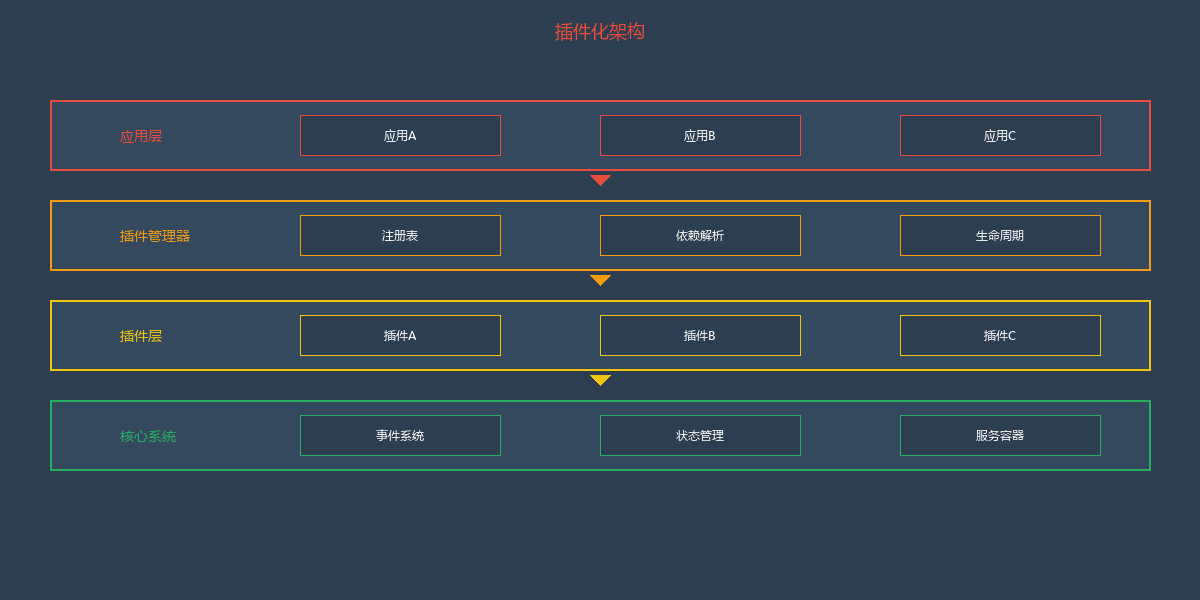
核心组件实现
1. 插件接口定义
// core/plugin.interface.ts

// 插件接口
export interface IPlugin {
  // 插件名称
  readonly name: string

  // 插件版本
  readonly version: string

  // 插件配置
  getConfig(): PluginConfig

  // 插件清单
  getManifest(): PluginManifest

  // 初始化
  initialize(context: PluginContext): Promise<void>

  // 激活
  activate(): Promise<void>

  // 停用
  deactivate(): Promise<void>

  // 销毁
  destroy(): Promise<void>

  // 获取暴露的能力
  provides(): Record<string, any>
}

// 插件配置
export interface PluginConfig {
  // 是否启用
  enabled: boolean

  // 优先级(加载顺序)
  priority: number

  // 依赖的其他插件
  dependencies: string[]

  // 配置项
  settings: Record<string, any>
}

// 插件清单
export interface PluginManifest {
  name: string
  version: string
  description: string
  author: string
  license: string
  homepage?: string
  repository?: string
  keywords: string[]
  dependencies: Record<string, string>
}

// 插件上下文
export interface PluginContext {
  // 事件总线
  eventBus: EventBus

  // 状态存储
  store: Store<any, any>

  // 服务容器
  container: ServiceContainer

  // 配置
  config: Record<string, any>

  // 日志
  logger: Logger
}
2. 插件基类
// core/base-plugin.ts
import { IPlugin, PluginConfig, PluginManifest, PluginContext } from './plugin.interface'

export abstract class BasePlugin implements IPlugin {
  protected context: PluginContext | null = null
  protected _config: PluginConfig

  abstract readonly name: string
  abstract readonly version: string
  abstract readonly manifest: PluginManifest

  constructor(config?: Partial<PluginConfig>) {
    this._config = {
      enabled: true,
      priority: 0,
      dependencies: [],
      settings: {},
      ...config,
    }
  }

  getConfig(): PluginConfig {
    return this._config
  }

  getManifest(): PluginManifest {
    return this.manifest
  }

  // 初始化
  async initialize(context: PluginContext): Promise<void> {
    this.context = context
    this.onInitialize()
  }

  protected onInitialize(): void {
    // 子类可重写
  }

  // 激活
  async activate(): Promise<void> {
    if (!this._config.enabled) return

    await this.onActivate()

    // 注册事件监听
    this.registerEventListeners()
  }

  protected abstract onActivate(): Promise<void>

  // 停用
  async deactivate(): Promise<void> {
    await this.onDeactivate()

    // 移除事件监听
    this.unregisterEventListeners()
  }

  protected onDeactivate(): Promise<void> {
    return Promise.resolve()
  }

  // 销毁
  async destroy(): Promise<void> {
    await this.deactivate()
    await this.onDestroy()
    this.context = null
  }

  protected onDestroy(): Promise<void> {
    return Promise.resolve()
  }

  // 注册事件监听
  protected registerEventListeners(): void {
    // 子类实现
  }

  // 移除事件监听
  protected unregisterEventListeners(): void {
    // 子类实现
  }

  // 获取能力(子类实现)
  abstract provides(): Record<string, any>

  // 发射事件
  protected emit(event: string, ...args: any[]): void {
    if (this.context?.eventBus) {
      this.context.eventBus.emit(`${this.name}:${event}`, ...args)
    }
  }

  // 监听事件
  protected on(event: string, handler: (...args: any[]) => void): void {
    if (this.context?.eventBus) {
      this.context.eventBus.on(event, handler)
    }
  }
}
3. 插件管理器
// core/plugin-manager.ts
import { IPlugin, PluginContext } from './plugin.interface'
import { EventBus } from './event-bus'
import { Store } from './store'
import { ServiceContainer } from './container'

export class PluginManager {
  private plugins: Map<string, IPlugin> = new Map()
  private registry: Map<string, any> = new Map()
  private context: PluginContext

  constructor(options: {
    eventBus: EventBus
    store: Store<any, any>
    container: ServiceContainer
    logger: Logger
  }) {
    this.context = {
      eventBus: options.eventBus,
      store: options.store,
      container: options.container,
      config: {},
      logger: options.logger,
    }
  }

  // 注册插件
  async register(plugin: IPlugin): Promise<void> {
    const { name } = plugin

    if (this.plugins.has(name)) {
      throw new Error(`Plugin ${name} already registered`)
    }

    // 检查依赖
    const config = plugin.getConfig()
    for (const dep of config.dependencies) {
      if (!this.plugins.has(dep)) {
        throw new Error(`Plugin ${name} depends on ${dep} which is not registered`)
      }
    }

    // 初始化
    await plugin.initialize(this.context)

    // 添加到注册表
    this.plugins.set(name, plugin)

    this.context.logger.info(`Plugin ${name} registered`)
  }

  // 加载所有插件(按优先级排序)
  async loadAll(): Promise<void> {
    const sortedPlugins = Array.from(this.plugins.values())
      .sort((a, b) => a.getConfig().priority - b.getConfig().priority)

    for (const plugin of sortedPlugins) {
      if (plugin.getConfig().enabled) {
        await this.activate(plugin.name)
      }
    }
  }

  // 激活插件
  async activate(pluginName: string): Promise<void> {
    const plugin = this.plugins.get(pluginName)
    if (!plugin) {
      throw new Error(`Plugin ${pluginName} not found`)
    }

    await plugin.activate()

    // 注册插件提供的能力
    const capabilities = plugin.provides()
    for (const [key, value] of Object.entries(capabilities)) {
      this.registry.set(`${pluginName}:${key}`, value)
    }

    this.context.logger.info(`Plugin ${pluginName} activated`)
  }

  // 停用插件
  async deactivate(pluginName: string): Promise<void> {
    const plugin = this.plugins.get(pluginName)
    if (!plugin) return

    await plugin.deactivate()

    // 移除注册的能力
    const capabilities = plugin.provides()
    for (const key of Object.keys(capabilities)) {
      this.registry.delete(`${pluginName}:${key}`)
    }

    this.context.logger.info(`Plugin ${pluginName} deactivated`)
  }

  // 获取能力
  getCapability<T>(pluginName: string, key: string): T {
    const fullKey = `${pluginName}:${key}`
    const capability = this.registry.get(fullKey)

    if (!capability) {
      throw new Error(`Capability ${fullKey} not found`)
    }

    return capability as T
  }

  // 获取所有能力
  getAllCapabilities(): Map<string, any> {
    return new Map(this.registry)
  }

  // 获取插件
  getPlugin(name: string): IPlugin | undefined {
    return this.plugins.get(name)
  }

  // 获取所有插件
  getAllPlugins(): IPlugin[] {
    return Array.from(this.plugins.values())
  }

  // 卸载插件
  async unregister(pluginName: string): Promise<void> {
    const plugin = this.plugins.get(pluginName)
    if (!plugin) return

    await this.deactivate(pluginName)
    await plugin.destroy()

    this.plugins.delete(pluginName)

    this.context.logger.info(`Plugin ${pluginName} unregistered`)
  }

  // 销毁所有插件
  async destroy(): Promise<void> {
    for (const [name] of this.plugins) {
      await this.unregister(name)
    }
  }
}
实际应用示例
PDF阅读器插件实现
// embedpdf/plugin-render.ts
import { BasePlugin } from '@embedpdf/core'

export interface RenderPluginConfig {
  quality: 'low' | 'medium' | 'high'
  enableTiling: boolean
  tileSize: number
}

export interface RenderCapability {
  renderPage: (pageNumber: number, options: RenderOptions) => Promise<Blob>
  renderThumbnail: (pageNumber: number) => Promise<Blob>
  invalidatePage: (pageNumber: number) => void
}

export class RenderPlugin extends BasePlugin {
  readonly name = '@embedpdf/plugin-render'
  readonly version = '1.0.0'
  readonly manifest = {
    name: '@embedpdf/plugin-render',
    version: '1.0.0',
    description: 'PDF page rendering plugin',
    author: 'EmbedPDF Team',
    license: 'MIT',
    keywords: ['pdf', 'render'],
    dependencies: {},
  }

  private renderCache: Map<number, Blob> = new Map()
  private config: RenderPluginConfig

  constructor(config?: Partial<RenderPluginConfig>) {
    super({
      enabled: true,
      priority: 10,
      dependencies: [],
      settings: config || {},
    })

    this.config = {
      quality: 'high',
      enableTiling: true,
      tileSize: 512,
      ...config,
    }
  }

  protected async onActivate(): Promise<void> {
    // 监听文档加载事件
    this.on('document:loaded', this.handleDocumentLoaded.bind(this))
    this.on('document:closed', this.handleDocumentClosed.bind(this))
    this.on('scale:changed', this.handleScaleChanged.bind(this))
  }

  provides(): Record<string, any> {
    return {
      render: this.buildCapability(),
    }
  }

  private buildCapability(): RenderCapability {
    return {
      renderPage: this.renderPage.bind(this),
      renderThumbnail: this.renderThumbnail.bind(this),
      invalidatePage: this.invalidatePage.bind(this),
    }
  }

  private async renderPage(pageNumber: number, options: RenderOptions): Promise<Blob> {
    const cacheKey = `${pageNumber}-${options.scale}-${options.rotation}`

    // 检查缓存
    if (this.renderCache.has(cacheKey)) {
      return this.renderCache.get(cacheKey)!
    }

    // 获取PDF引擎
    const engine = this.context?.container.get('pdfEngine')
    if (!engine) throw new Error('PDF engine not available')

    // 渲染页面
    const doc = this.context?.store.getState().document.current
    const blob = await engine.renderPage(doc, { number: pageNumber }, {
      scale: options.scale,
      rotation: options.rotation,
    })

    // 缓存结果
    this.renderCache.set(cacheKey, blob)

    // 发射事件
    this.emit('page:rendered', { pageNumber, blob })

    return blob
  }

  private async renderThumbnail(pageNumber: number): Promise<Blob> {
    return this.renderPage(pageNumber, { scale: 0.2, rotation: 0 })
  }

  private invalidatePage(pageNumber: number): void {
    // 清除缓存
    for (const key of this.renderCache.keys()) {
      if (key.startsWith(`${pageNumber}-`)) {
        this.renderCache.delete(key)
      }
    }
  }

  private handleDocumentLoaded(): void {
    // 文档加载后预渲染前几页
    this.preloadPages(1, 3)
  }

  private handleDocumentClosed(): void {
    // 清除所有缓存
    this.renderCache.clear()
  }

  private handleScaleChanged(): void {
    // 缩放改变时清除缓存(不同缩放比例需要重新渲染)
    this.renderCache.clear()
  }

  private async preloadPages(start: number, count: number): Promise<void> {
    for (let i = start; i < start + count; i++) {
      try {
        await this.renderThumbnail(i)
      } catch (error) {
        // 预渲染失败不中断
        console.warn(`Failed to preload page ${i}:`, error)
      }
    }
  }
}
使用插件
// app.ts
import { PluginManager } from '@embedpdf/core'
import { RenderPlugin } from '@embedpdf/plugin-render'
import { ZoomPlugin } from '@embedpdf/plugin-zoom'
import { AnnotationPlugin } from '@embedpdf/plugin-annotation'

async function initializePDFViewer() {
  // 创建插件管理器
  const pluginManager = new PluginManager({
    eventBus: new EventBus(),
    store: createStore(),
    container: new ServiceContainer(),
    logger: console,
  })

  // 注册插件
  await pluginManager.register(new RenderPlugin({
    quality: 'high',
    enableTiling: true,
  }))

  await pluginManager.register(new ZoomPlugin({
    min: 0.25,
    max: 5,
    step: 0.25,
  }))

  await pluginManager.register(new AnnotationPlugin({
    enabledTypes: ['highlight', 'text', 'ink'],
  }))

  // 激活所有插件
  await pluginManager.loadAll()

  // 获取能力
  const renderCapability = pluginManager.getCapability<RenderCapability>(
    '@embedpdf/plugin-render',
    'render'
  )

  // 使用能力
  const blob = await renderCapability.renderPage(1, { scale: 1.5, rotation: 0 })

  return pluginManager
}
总结
插件化架构设计的关键点:
- 接口契约:定义清晰的插件接口和能力契约
- 生命周期:管理插件的初始化、激活、停用、销毁
- 依赖管理:自动解析和加载插件依赖
- 事件通信:基于事件总线的松散耦合通信
- 能力注册:插件通过能力系统暴露功能
- 隔离性:插件间状态隔离,互不干扰
- 动态加载:支持运行时加载和卸载
下一篇将介绍Skills系统的设计与实现。