RAG知识库系统设计与实现

概述
RAG (Retrieval-Augmented Generation,检索增强生成) 是当前大模型应用的核心技术之一。本文将介绍如何在微服务平台中设计和实现完整的RAG知识库系统,包括文档处理、向量化存储、语义检索等关键环节。
RAG系统架构
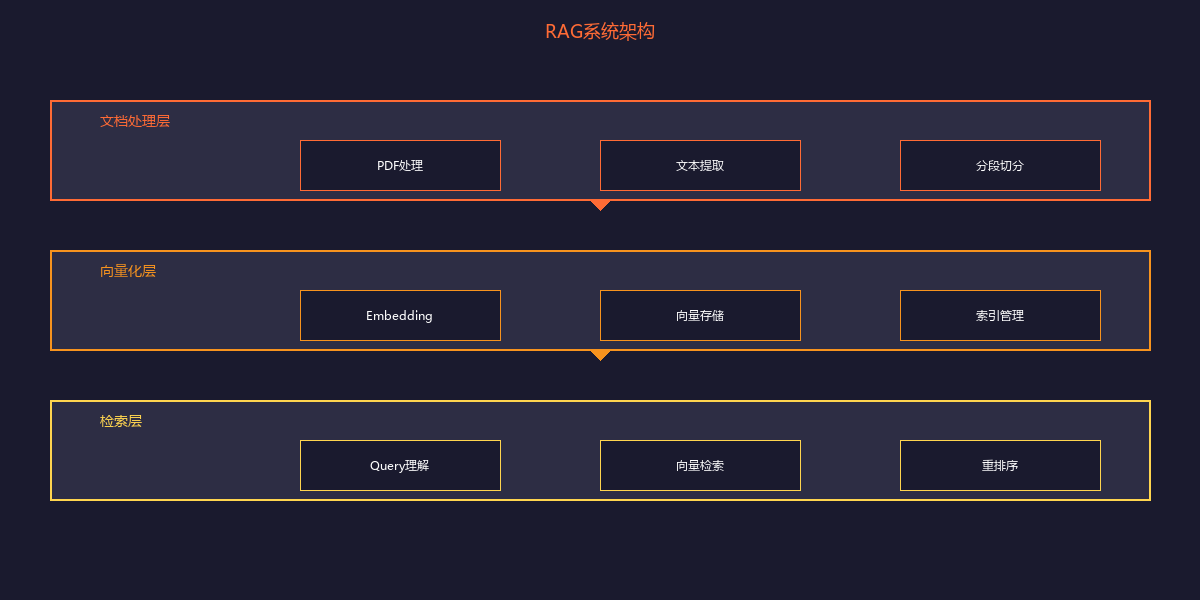
整体流程
服务结构
rag.api/
├── app.js
├── routes/
│   ├── rag/root.js           # 知识库管理API
│   ├── material/root.js      # 材料管理API
│   └── search/root.js        # 检索API
├── services/
│   ├── ragService.js         # 知识库服务
│   ├── materialService.js    # 材料服务
│   ├── embeddingService.js   # 向量化服务
│   └── searchService.js      # 检索服务
├── daos/
│   ├── milvus/               # Milvus向量数据库访问
│   │   ├── schema/
│   │   │   └── chunkSchema.js
│   │   └── dac/
│   │       └── chunkDac.js
│   └── mongo/                # MongoDB业务数据
└── grpc/
    └── servers/
        └── ragSearch.js      # gRPC检索服务
核心数据模型
知识库(RAG)模型
// MongoDB Schema - rag.api/daos/core/schema/ragSchema.js
{
  ragCode: "course-ai-101",         // 知识库唯一标识
  title: "人工智能基础课程",         // 知识库标题
  ragType: "course",                // 类型:course/knowledge/project
  description: "人工智能入门课程资料",

  // 向量模型配置
  embeddingModel: "bge-large-zh",   // 使用的嵌入模型
  vectorDimension: 1024,            // 向量维度

  // 权限控制
  permission: "private",            // private/public/organization
  members: [                        // 成员列表
    { userId: "user-1", role: "owner" },
    { userId: "user-2", role: "editor" }
  ],

  // 处理配置
  chunkSize: 500,                   // 分段大小(字符)
  chunkOverlap: 50,                 // 分段重叠
  needTrans: 1,                     // 是否需要翻译

  // 统计信息
  materialCount: 10,                // 材料数量
  chunkCount: 150,                  // 分片总数
  totalTokens: 50000,               // 总Token数

  createdAt: Date,
  updatedAt: Date
}
材料(Material)模型
// MongoDB Schema - materialSchema.js
{
  materialCode: "mat-uuid",
  ragCode: "course-ai-101",

  // 基本信息
  title: "第一章:机器学习概述",
  materialType: "pdf",              // pdf/docx/txt/html

  // 文件信息
  fileInfo: {
    originalName: "chapter1.pdf",
    fileSize: 2048000,              // 字节
    mimeType: "application/pdf",
    filePath: "/rag/course-ai-101/chapter1.pdf"
  },

  // 处理状态
  status: "completed",              // pending/processing/completed/failed
  processProgress: 100,             // 处理进度

  // 内容摘要
  summary: "本章介绍了机器学习的基本概念...",
  keywords: ["机器学习", "监督学习", "无监督学习"],

  // 统计
  chunkCount: 15,
  totalTokens: 5000,

  createdAt: Date
}
向量存储模型 (Milvus)
// Milvus Collection Schema - chunkSchema.js
{
  // 主键
  ragChunkCode: "chunk-uuid",       // 分片唯一标识

  // 关联信息
  ragCode: "course-ai-101",         // 所属知识库
  materialCode: "mat-uuid",         // 所属材料

  // 内容信息
  content: "机器学习是人工智能的一个分支...",
  contentEn: "Machine learning is a branch of AI...",  // 翻译内容

  // 向量字段 (1024维)
  contentVector: [0.023, -0.156, ...],      // 中文内容向量
  contentEnVector: [0.045, -0.089, ...],    // 英文内容向量

  // 位置信息
  chunkIndex: 5,                    // 分段序号
  startPosition: 2500,              // 起始位置
  endPosition: 3000,                // 结束位置

  // 元数据
  tokenCount: 450,
  createdAt: Date
}

// Milvus索引配置
{
  fieldName: "contentVector",
  indexType: "IVF_FLAT",            // 索引类型
  metricType: "COSINE",             // 距离度量:余弦相似度
  params: { nlist: 128 }            // 聚类中心数
}
文档处理流程
1. 文档上传与解析
// services/materialService.js
class MaterialService {
  constructor(fastify) {
    this.fastify = fastify
  }

  // 上传材料
  async uploadMaterial(ragCode, file, userId) {
    // 保存原始文件
    const fileInfo = await this.saveFile(file, ragCode)

    // 创建材料记录
    const material = {
      materialCode: generateUUID(),
      ragCode,
      title: file.originalname,
      materialType: this.getFileType(file.mimetype),
      fileInfo,
      status: 'pending',
      createdBy: userId,
      createdAt: new Date()
    }

    await this.fastify.mongo.db
      .collection('materials')
      .insertOne(material)

    // 异步处理文档
    await this.processMaterialAsync(material.materialCode)

    return material
  }

  // 异步处理文档
  async processMaterialAsync(materialCode) {
    // 发送到Kafka队列异步处理
    await this.fastify.kafka.producer.send({
      topic: 'rag-material-process',
      messages: [{
        key: materialCode,
        value: JSON.stringify({ materialCode })
      }]
    })
  }
}
2. 文档内容提取 (transform.api)
# transform.api/services/pdf.py
import pypdfium2 as pdfium
from typing import List, Dict

class PDFProcessor:
    def __init__(self):
        self.ocr_service = OCRService()

    def extract_text(self, file_path: str) -> Dict:
        """提取PDF文本内容"""
        pdf = pdfium.PdfDocument(file_path)

        pages = []
        for page_num in range(len(pdf)):
            page = pdf[page_num]

            # 提取文本
            text_page = page.get_textpage()
            text = text_page.get_text_range()

            # 提取页面图片(用于OCR)
            images = self.extract_page_images(page)

            pages.append({
                'pageNum': page_num + 1,
                'text': text,
                'images': images,
                'charCount': len(text)
            })

        return {
            'totalPages': len(pdf),
            'pages': pages,
            'fullText': '\n'.join([p['text'] for p in pages])
        }

    def extract_page_images(self, page) -> List[Dict]:
        """提取页面中的图片"""
        # 获取页面渲染为图片
        bitmap = page.render(
            scale=2.0,  # 2倍分辨率
            rotation=0,
            crop=(0, 0, page.get_width(), page.get_height())
        )

        # 保存图片并返回路径
        image_path = f"/tmp/page_{page.get_index()}.png"
        bitmap.save_as_png(image_path)

        return [{'path': image_path, 'width': bitmap.width, 'height': bitmap.height}]
3. OCR文本识别
# transform.api/services/ocr.py
from xinference_client import Client as XinferenceClient
import openai

class OCRService:
    def __init__(self):
        self.xinference = XinferenceClient("http://xinference-server:9997")
        self.openai = openai.OpenAI()

    async def recognize_image(self, image_path: str) -> str:
        """识别图片中的文字"""
        # 使用Xinference OCR模型
        model = self.xinference.get_model("ocr-model")
        result = model.chat({
            'image': image_path,
            'prompt': 'Extract all text from this image'
        })

        return result['choices'][0]['message']['content']

    async def recognize_with_multimodal(self, image_path: str) -> str:
        """使用多模态模型识别"""
        with open(image_path, 'rb') as f:
            import base64
            image_base64 = base64.b64encode(f.read()).decode()

        response = self.openai.chat.completions.create(
            model="gpt-4-vision-preview",
            messages=[{
                "role": "user",
                "content": [
                    {"type": "text", "text": "Extract all text from this image:"},
                    {"type": "image_url", "image_url": f"data:image/png;base64,{image_base64}"}
                ]
            }]
        )

        return response.choices[0].message.content
4. 语义分段
# transform.api/services/chunker.py
import spacy
from typing import List, Dict

class SemanticChunker:
    def __init__(self):
        # 加载中文NLP模型
        self.nlp = spacy.load("zh_core_web_sm")

    def chunk_text(self, text: str, chunk_size: int = 500, overlap: int = 50) -> List[Dict]:
        """语义分段"""
        doc = self.nlp(text)

        chunks = []
        current_chunk = []
        current_size = 0

        for sent in doc.sents:
            sent_text = sent.text.strip()
            sent_length = len(sent_text)

            # 如果当前块加上新句子超过限制,保存当前块
            if current_size + sent_length > chunk_size and current_chunk:
                chunk_text = ' '.join(current_chunk)
                chunks.append({
                    'text': chunk_text,
                    'tokenCount': len(chunk_text),
                    'sentenceCount': len(current_chunk)
                })

                # 保留重叠部分
                overlap_text = ' '.join(current_chunk[-2:]) if len(current_chunk) >= 2 else current_chunk[-1]
                current_chunk = [overlap_text, sent_text]
                current_size = len(overlap_text) + sent_length
            else:
                current_chunk.append(sent_text)
                current_size += sent_length

        # 处理最后一个块
        if current_chunk:
            chunks.append({
                'text': ' '.join(current_chunk),
                'tokenCount': len(' '.join(current_chunk)),
                'sentenceCount': len(current_chunk)
            })

        return chunks
向量化与存储
1. Embedding服务
// services/embeddingService.js
class EmbeddingService {
  constructor(fastify) {
    this.fastify = fastify
    this.embeddingModel = process.env.EMBEDDING_MODEL || 'bge-large-zh'
    this.embeddingEndpoint = process.env.EMBEDDING_ENDPOINT
  }

  // 文本向量化
  async embedText(text, language = 'zh') {
    const response = await fetch(`${this.embeddingEndpoint}/embeddings`, {
      method: 'POST',
      headers: { 'Content-Type': 'application/json' },
      body: JSON.stringify({
        model: this.embeddingModel,
        input: text,
        language
      })
    })

    const result = await response.json()
    return result.data[0].embedding
  }

  // 批量向量化
  async embedTexts(texts, language = 'zh') {
    const response = await fetch(`${this.embeddingEndpoint}/embeddings`, {
      method: 'POST',
      headers: { 'Content-Type': 'application/json' },
      body: JSON.stringify({
        model: this.embeddingModel,
        input: texts,
        language
      })
    })

    const result = await response.json()
    return result.data.map(d => d.embedding)
  }
}
2. Milvus向量存储
// daos/milvus/dac/chunkDac.js
class ChunkDac {
  constructor(milvusClient) {
    this.client = milvusClient
    this.collectionName = 'rag_chunks'
  }

  // 插入向量
  async insertChunks(chunks) {
    const entities = chunks.map(chunk => ({
      ragChunkCode: chunk.ragChunkCode,
      ragCode: chunk.ragCode,
      materialCode: chunk.materialCode,
      content: chunk.content,
      contentEn: chunk.contentEn,
      contentVector: chunk.contentVector,
      contentEnVector: chunk.contentEnVector,
      chunkIndex: chunk.chunkIndex,
      tokenCount: chunk.tokenCount
    }))

    const result = await this.client.insert({
      collectionName: this.collectionName,
      data: entities
    })

    return result
  }

  // 向量检索
  async searchSimilarChunks(ragCode, queryVector, limit = 5, filters = {}) {
    const searchParams = {
      collectionName: this.collectionName,
      data: [queryVector],
      annsField: 'contentVector',
      searchParams: {
        metricType: 'COSINE',
        params: { nprobe: 128 }
      },
      limit,
      outputFields: ['ragChunkCode', 'ragCode', 'materialCode', 'content', 'contentEn'],
      expr: `ragCode == "${ragCode}"`  // 过滤条件
    }

    const results = await this.client.search(searchParams)

    return results.map(result => ({
      ragChunkCode: result.entity.ragChunkCode,
      ragCode: result.entity.ragCode,
      materialCode: result.entity.materialCode,
      content: result.entity.content,
      contentEn: result.entity.contentEn,
      score: result.score,  // 相似度分数
      distance: result.distance
    }))
  }
}
检索服务
1. 检索API
// routes/search/root.js
export default async function searchRoutes(fastify, opts) {

  // 知识库检索
  fastify.post('/rag', async (request, reply) => {
    const { ragCode, query, limit = 5 } = request.body

    // 权限检查
    await fastify.ragService.checkPermission(ragCode, request.user.userId)

    // 执行检索
    const results = await fastify.searchService.search(ragCode, query, limit)

    return {
      success: true,
      data: results
    }
  })
}

// services/searchService.js
class SearchService {
  constructor(fastify) {
    this.fastify = fastify
  }

  async search(ragCode, query, limit = 5) {
    // 1. 向量化查询
    const queryVector = await this.fastify.embeddingService.embedText(query)

    // 2. 向量检索
    const chunks = await this.fastify.chunkDac.searchSimilarChunks(
      ragCode,
      queryVector,
      limit * 2  // 检索更多用于重排序
    )

    // 3. 重排序 (可选)
    const reranked = await this.rerank(query, chunks, limit)

    // 4. 获取材料信息
    const results = await this.enrichResults(reranked)

    return results
  }

  // 重排序
  async rerank(query, chunks, limit) {
    // 使用交叉编码器进行重排序
    const scores = await Promise.all(
      chunks.map(async chunk => {
        const score = await this.calculateRelevance(query, chunk.content)
        return { ...chunk, relevanceScore: score }
      })
    )

    // 按相关性排序
    scores.sort((a, b) => b.relevanceScore - a.relevanceScore)

    return scores.slice(0, limit)
  }
}
2. gRPC检索服务
// grpc/servers/ragSearch.js
import grpc from '@grpc/grpc-js'

const ragSearchProto = `
syntax = "proto3";

service RagSearchService {
  rpc SearchRag(SearchRequest) returns (SearchResponse);
}

message SearchRequest {
  string ragCode = 1;
  string query = 2;
  int32 limit = 3;
}

message SearchResult {
  string ragChunkCode = 1;
  string content = 2;
  float score = 3;
}

message SearchResponse {
  repeated SearchResult results = 1;
  int32 total = 2;
}
`

export default async function ragSearchServer(fastify) {
  const server = new grpc.Server()

  server.addService(RagSearchService.service, {
    searchRag: async (call, callback) => {
      try {
        const { ragCode, query, limit } = call.request

        const results = await fastify.searchService.search(
          ragCode,
          query,
          limit
        )

        callback(null, {
          results: results.map(r => ({
            ragChunkCode: r.ragChunkCode,
            content: r.content,
            score: r.score
          })),
          total: results.length
        })
      } catch (error) {
        callback(error)
      }
    }
  })

  return server
}
RAG与LLM集成
完整RAG流程
// 在llm.api中集成RAG
class LLMService {
  async chatWithRAG(channelCode, message, ragCodes = []) {
    // 1. 检索相关上下文
    let contexts = []
    for (const ragCode of ragCodes) {
      const results = await this.fastify.grpcClients.ragSearch.search({
        ragCode,
        query: message,
        limit: 3
      })
      contexts.push(...results.results)
    }

    // 2. 构建增强提示
    const contextText = contexts
      .map((ctx, i) => `[${i + 1}] ${ctx.content}`)
      .join('\n\n')

    const augmentedPrompt = `基于以下参考资料回答问题:

${contextText}

用户问题:${message}

请基于参考资料回答,如果参考资料中没有相关信息,请明确说明。`

    // 3. 调用LLM生成回答
    const response = await this.fastify.openai.chat.completions.create({
      model: 'gpt-4',
      messages: [
        { role: 'system', content: '你是一个基于知识库回答问题的助手。' },
        { role: 'user', content: augmentedPrompt }
      ],
      stream: true
    })

    return {
      stream: response,
      contexts: contexts.map(c => ({
        content: c.content,
        score: c.score,
        source: c.ragChunkCode
      }))
    }
  }
}
性能优化
1. 索引优化
// Milvus索引配置优化
const indexParams = {
  collectionName: 'rag_chunks',
  fieldName: 'contentVector',
  indexType: 'IVF_FLAT',  // 或 HNSW 用于更高性能
  metricType: 'COSINE',
  params: {
    nlist: 128,  // 聚类中心数,根据数据量调整
    nprobe: 32   // 查询时搜索的聚类数
  }
}

// HNSW配置(更高召回率)
const hnswParams = {
  indexType: 'HNSW',
  params: {
    M: 16,        // 图的最大度数
    efConstruction: 200,  // 构建时的搜索范围
    ef: 128       // 查询时的搜索范围
  }
}
2. 缓存策略
// 缓存查询结果
async searchWithCache(ragCode, query, limit) {
  const cacheKey = `rag:search:${hashString(ragCode + query)}`
  const cached = await this.fastify.redis.get(cacheKey)

  if (cached) {
    return JSON.parse(cached)
  }

  const results = await this.search(ragCode, query, limit)

  // 缓存5分钟
  await this.fastify.redis.setex(cacheKey, 300, JSON.stringify(results))

  return results
}
总结
RAG知识库系统的设计要点:
- 文档处理链路:PDF解析 → OCR识别 → 语义分段
- 向量化存储:选择合适的Embedding模型和向量数据库
- 检索优化:向量检索 + 重排序提升准确性
- 权限控制:知识库级别的访问控制
- 性能优化:索引、缓存、批量处理
下一篇将介绍微前端架构的设计与实践。