本地部署 Xinference v1.14.0 + Docker Compose + 自动加载模型
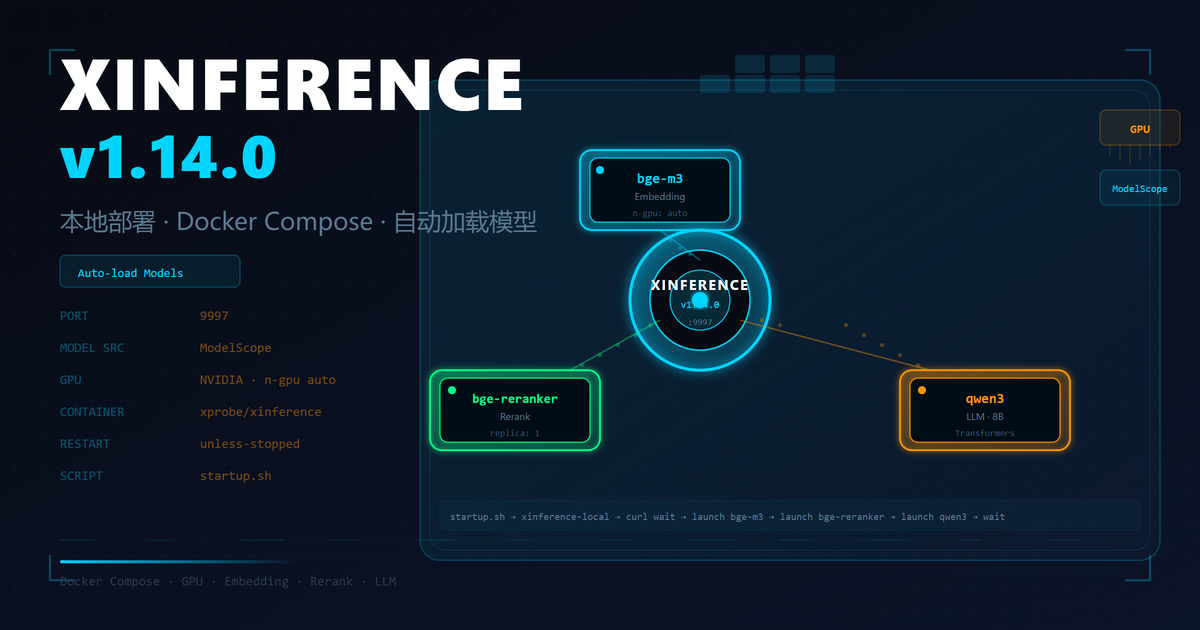
什么是 Xinference
Xinference 是一个开源的大模型推理框架,支持本地部署各类开源大模型,包括 LLM、Embedding、Rerank 等模型类型。它提供类似 OpenAI API 的接口,方便与现有应用集成。
本文介绍如何通过 Docker Compose 在本地部署 Xinference v1.14.0,并配置开机自动加载常用模型。
Docker Compose 配置
首先创建目录结构:
mkdir -p xinference/data/xinference xinference/data/huggingface xinference/data/modelscope
编写 docker-compose.yaml:
services:
  inference:
    volumes:
      - ./data/xinference:/root/.xinference
      - ./data/huggingface:/root/.cache/huggingface
      - ./data/modelscope:/root/.cache/modelscope
    container_name: inference
    restart: unless-stopped
    image: xprobe/xinference:v1.14.0
    ports:
      - '9997:9997'
    environment:
      - XINFERENCE_MODEL_SRC=modelscope
    deploy:
      resources:
        reservations:
          devices:
            - driver: nvidia
              count: all
              capabilities: [gpu]
    command: sh /root/.xinference/startup.sh
关键配置说明
- GPU 支持:通过
deploy.resources.reservations.devices配置 NVIDIA GPU 直通,让容器可以使用本地显卡进行推理 - 模型源:设置
XINFERENCE_MODEL_SRC=modelscope使用 ModelScope 作为默认模型下载源(国内访问更快) - 端口映射:将容器的 9997 端口映射到宿主机的 9997
- 持久化:将模型缓存目录映射到宿主机,避免重启后重复下载
自动加载模型脚本
创建 data/xinference/startup.sh:
#!/bin/bash
# 启动 Xinference 服务(后台运行)
xinference-local -H 0.0.0.0 --port 9997 &

# 检测服务是否启动成功
while true; do
  if curl -s "http://localhost:9997" > /dev/null; then
    break
  else
    sleep 1
  fi
done

# 自动加载 bge-m3  embedding 模型
xinference launch --model-name bge-m3 --model-type embedding --replica 1 --n-gpu auto &

# 自动加载 bge-reranker-large  重排序模型
xinference launch --model-name bge-reranker-large --model-type rerank --replica 1 --n-gpu auto &

# 自动加载 qwen3  大语言模型
xinference launch --model-name qwen3 --model-type LLM --model-engine Transformers --model-format pytorch --size-in-billions 8 --quantization none --n-gpu auto --replica 1 --n-worker 1 --enable-thinking true --reasoning-content false &

# 等待所有后台任务结束
wait
启动脚本说明
- 启动
xinference-local服务进程 - 通过轮询检测服务是否就绪
- 自动加载三个常用模型(全部后台执行,不阻塞启动流程):
- bge-m3:文本 Embedding 模型,用于文本向量化
- bge-reranker-large:重排序模型,用于优化搜索结果
- qwen3:通义千问大语言模型,支持思考模式
记得给脚本添加执行权限:
chmod +x data/xinference/startup.sh
启动服务
docker compose up -d
docker compose ps
服务启动后,访问 http://localhost:9997 可打开 Xinference Web UI 进行模型管理。
常用模型启动命令参考
启动 LLM 模型
xinference launch --model-name deepseek-r1-distill-qwen --model-type LLM --model-engine Transformers --model-format pytorch --size-in-billions 1_5 --quantization none --n-gpu auto --replica 1 --n-worker 1 --reasoning-content false
启动 Embedding 模型
xinference launch --model-name bge-m3 --model-type embedding --replica 1 --n-gpu auto
启动 Rerank 模型
xinference launch --model-name bge-reranker-large --model-type rerank --replica 1 --n-gpu auto
常见问题
模型下载慢
确保设置了 XINFERENCE_MODEL_SRC=modelscope,国内访问 ModelScope 比 HuggingFace 快很多。也可以提前手动下载模型到对应缓存目录。
GPU 未被识别
检查宿主机 NVIDIA 驱动和 Docker NVIDIA Container Toolkit 是否正确安装:
nvidia-smi
docker run --rm --gpus all nvidia/cuda:11.8.0-base-ubuntu22.04 nvidia-smi
模型加载失败
检查日志排查问题:
docker logs -f inference